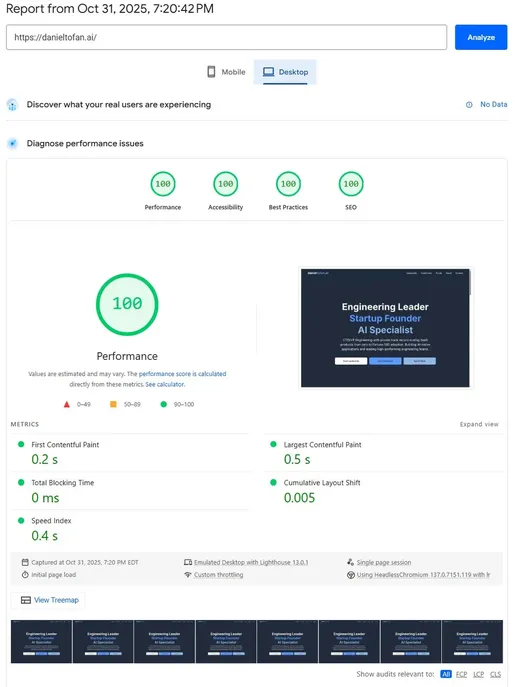
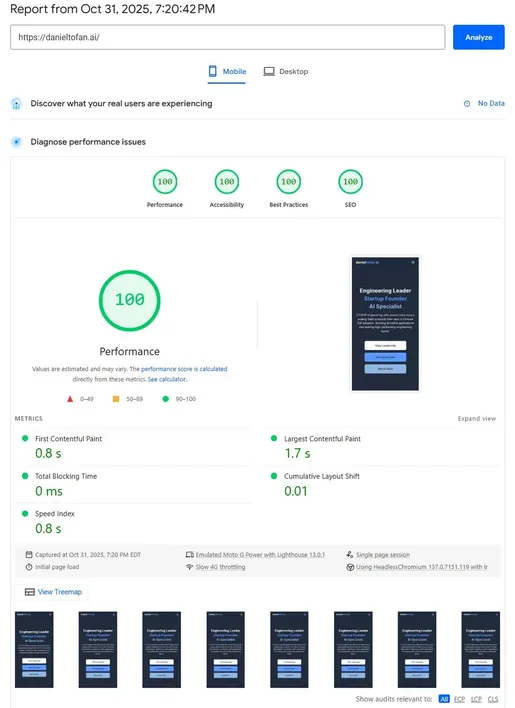
100/100/100/100 PageSpeed
How we optimized this portfolio site from 90/100 to perfect scores on both desktop and mobile
The Journey: 90 → 100
This site started with a respectable 90/100 mobile score. Good, but not perfect. Here's how we achieved 100/100/100/100 on both desktop and mobile through systematic optimization.
Optimization Techniques Applied
1. CSS Delivery (88% file size reduction)
Before: Tailwind CDN (123.8KB + 770ms blocking)
After: Local build with tree-shaking (14KB, inlined to eliminate HTTP request)
Result: Zero render-blocking CSS, dramatically faster FCP
2. Font Optimization (eliminated 2,155ms latency)
Before: Google Fonts external links (750ms CSS + 1,405ms font files)
After: Self-hosted Inter fonts (72KB total) with preload hints
Result: No external DNS lookups, faster LCP, zero FOUT
3. Image Compression (20KB saved)
Before: WebP quality 80 (21-22KB per image)
After: WebP quality 70 (16-18KB per image)
Result: Smaller downloads with visually identical quality
4. Zero Layout Shift (CLS: 0)
Key: font-display: swap in all @font-face declarations
Result: Fonts load without blocking, no content jump, perfect stability
5. Semantic HTML (Accessibility 100/100)
Before: Missing ARIA labels, no <main> landmark
After: Proper semantic tags, ARIA labels on interactive elements
Result: Perfect accessibility score, better SEO
Key Learnings
- ✓ Local CSS builds are 88% smaller than CDN versions
- ✓ Self-hosting fonts eliminates 2+ seconds of latency
- ✓ WebP quality 70 is the sweet spot for file size vs visual quality
-
✓
font-display: swapprevents layout shift and invisible text - ✓ Preloading critical fonts improves LCP by ensuring they load early
- ✓ Inlining CSS eliminates render-blocking (but only if it doesn't cause CLS)
Note: Mobile scores are tested under harsh conditions (Slow 4G throttling, 4x CPU slowdown). Achieving 100/100 on throttled mobile is significantly harder—and more meaningful—than desktop 100/100.
Desktop Results
Mobile Results
Tech Stack
CSS
Tailwind CSS v3 (local build, tree-shaken, inlined)
Fonts
Inter (self-hosted, WOFF2, preloaded)
Images
WebP quality 70 (Sharp optimization)
Want these results for your project?
Get in Touch